
Frontend
An honest LIVE indicator: three bugs from building a real-time monitoring dashboard
Argus streams server health over WebSockets into a React dashboard with gauges and charts. Three small bugs taught us the most: a LIVE badge that went stale while data was flowing, a chart that threw thousands of errors per second, and a gauge that rendered at zero width.
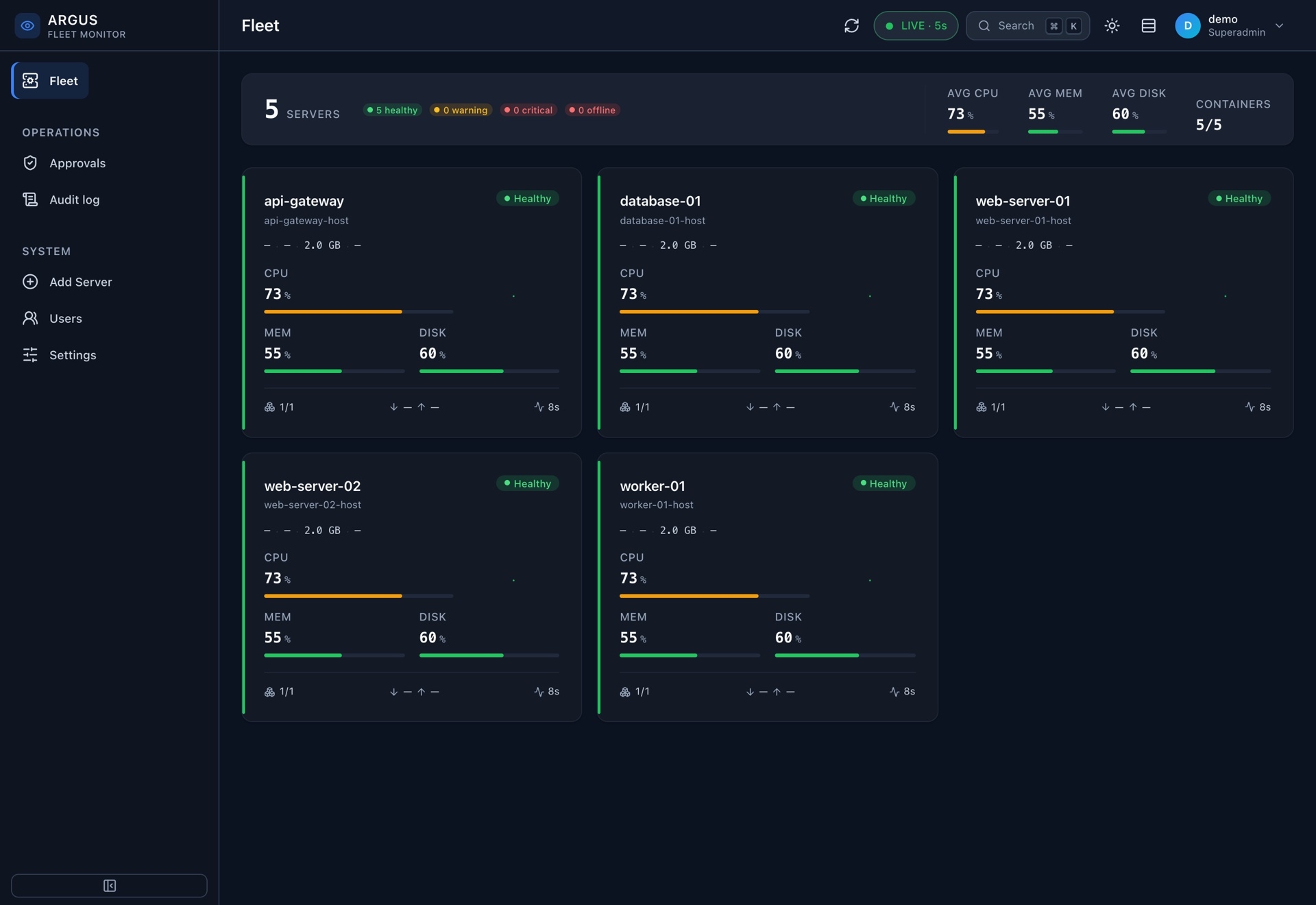
Argus is our multi-server monitoring system. A lightweight agent runs on each machine and reports to a central server. The dashboard shows the health of the whole fleet live: CPU, memory, disk and containers per server, a resource timeline and the top processes. It has role-based access, approvals for risky commands and an audit log.
The interesting part of a dashboard like this is not the charts themselves. It is making sure that what the screen says is true right now. This post covers three bugs on the frontend (React, TanStack Query, ECharts and a WebSocket) that each broke that promise in a different way.
Bug 1: the LIVE badge that lied
The top bar shows a small indicator: LIVE when fresh data arrived recently, stale when it has been too long. It is the single most important element on the page. If it says LIVE, an operator assumes the numbers below are current.
The first version tracked freshness through the data-fetching library. Whenever a query went from "fetching" to "idle", it stamped "last updated: now":
const [lastUpdated, setLastUpdated] = useState(() => Date.now())

useEffect(() => {
  if (wasFetching.current && !isFetching) setLastUpdated(Date.now())
  wasFetching.current = isFetching
}, [isFetching])
Then we added the WebSocket. Instead of polling, the central server pushes new snapshots, and the socket handler writes them straight into the query cache with setQueryData(). Data on screen updated every few seconds, exactly as intended.
And after a while, the badge flipped to stale.
setQueryData() is a direct cache write. It is not a fetch, so there is never a "fetching to idle" transition, and the timestamp never moved. The data was fresh. The indicator said it was old. In monitoring, that is almost worse than the opposite mistake, because it teaches operators to ignore the warning.
The fix was to make "last activity" a tiny external store that anything can update, React or not:
let lastUpdatedAt = Date.now()
const listeners = new Set()

// Call this at the exact moment a live update is applied outside of react-query's fetch lifecycle.
export function markActivityNow() {
  lastUpdatedAt = Date.now()
  listeners.forEach((listener) => listener())
}

function subscribe(listener) {
  listeners.add(listener)
  return () => listeners.delete(listener)
}

function getSnapshot() {
  return lastUpdatedAt
}

// In the component:
const lastUpdated = useSyncExternalStore(subscribe, getSnapshot)
The WebSocket handler calls markActivityNow() right after it writes to the cache, and the fetch path calls the same function. useSyncExternalStore is React's supported way to subscribe to state that lives outside React, and it avoids tearing when several components read the same value.
The lesson: a freshness indicator must be driven by every path that delivers data. If you add a new path, the indicator needs to know about it.
Bug 2: thousands of errors per second from a chart
The server detail page shows a resource timeline: CPU, memory and disk usage over the last window, as smooth area lines. The query behind it refetches every five seconds, and the chart re-renders with notMerge, which replaces the whole option object.
On test machines it looked fine. On real servers, the browser console filled with:
TypeError: Cannot read properties of undefined
thousands of times per second, from inside ECharts' animation code.
Two things combined. First, with notMerge, every refetch made ECharts replay its entry animation from scratch, every five seconds. Second, real servers have boring metrics. Disk usage over a five-minute window is usually a perfectly flat line. ECharts' per-frame interpolation for a smoothed area series could throw on these degenerate, constant series. Each animation frame threw again, so a calm, healthy server produced a flood of errors.
The fix was to turn animation off for this chart:
const option = {
  // The chart re-renders every refetch (5 s) with notMerge, so ECharts would replay its
  // entry animation each time: visually jittery, and its per-frame interpolation throws on
  // flat smooth+area series such as a disk % that doesn't move over the window.
  animation: false,
  // ...
}
This also fixed a design problem we had been ignoring. A chart that re-animates every five seconds jitters. For live data, a static chart that simply updates reads better.
The gauges on the same page got a related guard. They still animate, so a missing or stale field (undefined or NaN) would make the gauge animation throw too. Every gauge value now passes through a small function:
// A non-finite value would make the ECharts gauge animation throw, so coerce to a finite 0.
const gaugeNum = (v) => (isNum(v) ? v : 0)

<Gauge value={gaugeNum(vm.cpuPercent)} label="CPU" />
<Gauge value={gaugeNum(disk?.usedPercent)} label="Disk" sublabel={disk?.mount ?? '—'} />
The lesson: test live components with live-shaped data. Real metrics are flat, missing and repetitive far more often than demo data is.
Bug 3: a gauge that was there and not there
When we first added the gauge component, the gauges rendered as empty space. No errors, no warnings. The component mounted, ECharts initialised, the canvas existed. It was just zero pixels wide.
The gauge sat inside a flex column with align-items: center. In that layout, a child without an explicit width shrinks to its content. The ECharts wrapper's content is a canvas that sizes itself from its parent, so the parent had no width to give it. Each side waited for the other, and both ended up at zero.
The fix was one style property:
{/* width:100% is required: inside the flex-column .gauge (align-items:center)
    the echarts wrapper would otherwise collapse to 0 width and render blank */}
<ReactECharts option={option} style={{ height: 120, width: '100%' }} notMerge />
The comment is longer than the fix, on purpose. Without it, someone tidying up styles later would remove width: '100%' because it "does nothing".
The lesson: canvas-based chart libraries measure their container. Give them a container with real dimensions, especially inside flex and grid layouts that size children by content.
What these have in common
None of the three bugs threw an error that would show up in a normal test run, and two of them produced no errors at all. They were all about whether the screen told the truth: whether the data was fresh, whether a chart was stable, whether a gauge was even visible.
For any real-time dashboard, we now check:
- every data path updates the freshness indicator;
- live-updating charts do not re-animate on each update;
- every number that reaches a chart is finite;
- every chart container has real width and height;
- the page is tested against real, boring production data before it is called done.
- React
- WebSockets
- ECharts
- Monitoring
- Dashboard
- Real-time