
Mobile
Rendering a printed Mushaf on a phone: per-page fonts, line fitting and an LRU cache
Our Quran app shows each Mushaf page exactly as it is printed, line for line. That takes one font per page, careful line-fitting math and a font cache that never deletes the page you are reading. Here is how it works in React Native.
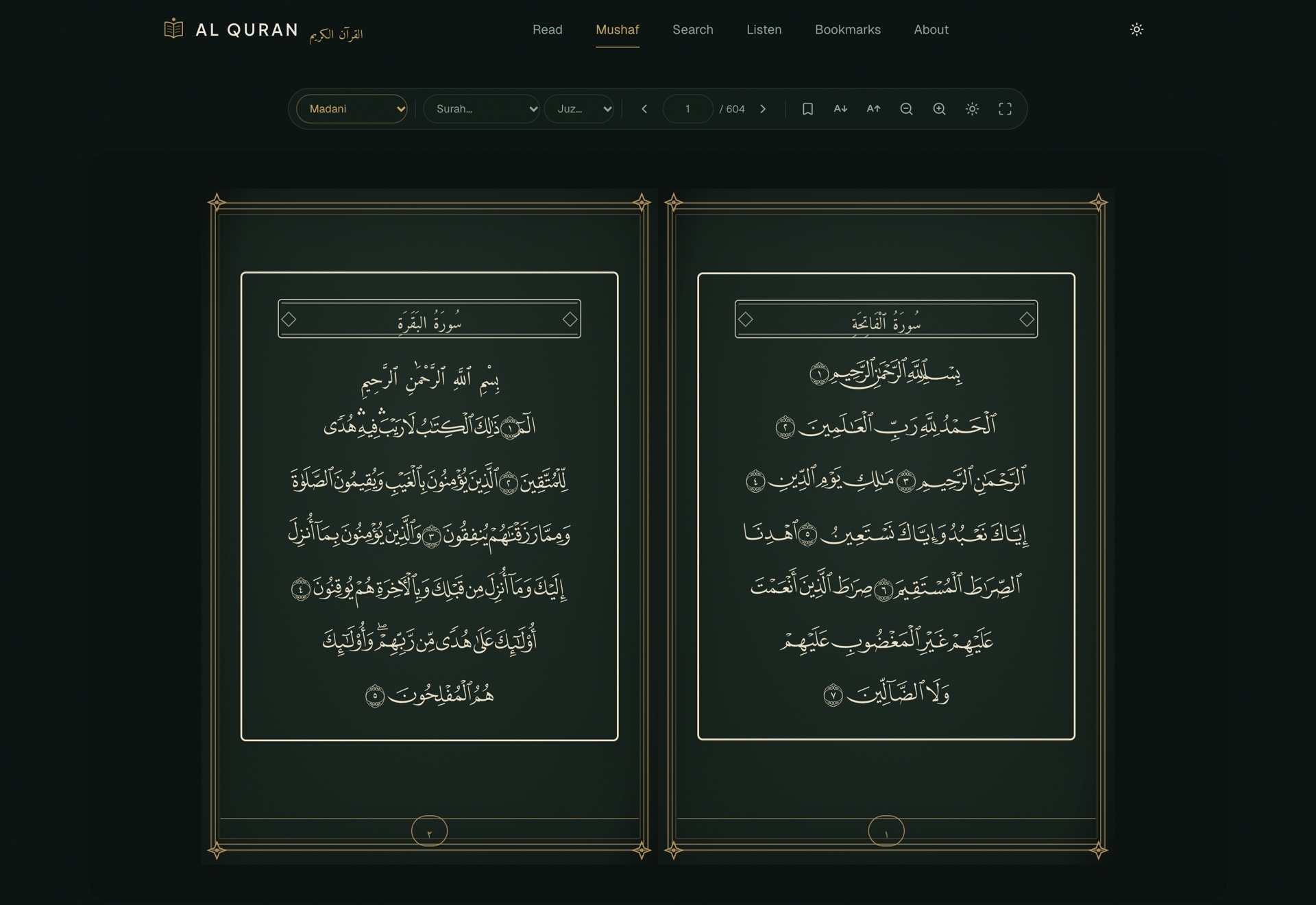
Most Quran apps show the text as a scrolling list of ayahs. That is useful for study, but it is not what a reader holding a printed Mushaf is used to. In print, every page has the same fifteen lines, every line ends in the same place, and people memorise by page position: "the ayah at the top of the left page".
Our Quran app has a Mushaf mode that reproduces printed pages line for line, in four editions, on the web and on iOS and Android. This post covers the mobile side: how the pages are drawn, how lines are fitted to the page width, and how hundreds of page fonts are cached on a phone without filling it up.
One font per page
The Madinah-style editions are drawn with the QPC glyph fonts. Instead of one font for the whole Quran, there is one TrueType font per page. Each page's font contains pre-shaped glyphs for the exact words on that page, so a line is rendered as a short sequence of glyph codes rather than as Arabic text shaped at runtime. The result is pixel-faithful to the printed page, ligatures and all, regardless of the phone's own Arabic shaping.
The IndoPak edition works the other way: one Nastaleeq font covers the whole Mushaf, and the text is real Arabic that the device shapes.
So the app needs a single function that answers "which font family draws this page?":
export function mushafFontFamily(layout: string, page: number): string {
  return layout === 'indopak' ? 'indopak-nastaleeq' : `qcf-${layout}-p${page}`
}

export function mushafFontUrl(layout: string, page: number): string {
  return layout === 'indopak'
    ? `${API_BASE}/fonts/mushaf/indopak/indopak-nastaleeq.ttf`
    : `${API_BASE}/fonts/mushaf/${layout}/p${page}.ttf`
}
Fonts are served by our own API rather than a third-party CDN, so the app controls exactly which version of each file it gets.
Loading a font only when it is needed
Shipping every page font inside the app would make the download enormous. Instead, a page's font is fetched the first time that page is opened, saved to the cache directory and registered with expo-font. The function that does this has three paths:
export async function ensureMushafFont(layout: string, page: number): Promise<string> {
  const family = mushafFontFamily(layout, page)

  if (isLoaded(family)) {
    bumpLastUsed(family)          // fast path: already registered this session
    return family
  }

  const pending = inFlight.get(family)
  if (pending) return pending     // someone is already downloading it

  const promise = registerFont(layout, page, family).finally(() => {
    inFlight.delete(family)
  })
  inFlight.set(family, promise)
  return promise
}
The inFlight map matters more than it looks. A page pager mounts the current page and its neighbours at the same time, and two views often ask for the same font in the same frame. Without the map, both would start a download and both would try to register the font. With it, they share one promise.
Do not record what did not happen
Registration is where we found our first real bug. The original version wrote a "this font is cached and was used just now" record, then called loadAsync. If registration failed (a corrupt download, a native error), the app had a usage record for a font that was not actually loaded. The fix was simply to reorder:
async function registerFont(layout: string, page: number, family: string) {
  const file = new File(fontsDir(), `${family}.ttf`)
  if (!file.exists) {
    await File.downloadFileAsync(mushafFontUrl(layout, page), file, { idempotent: true })
  }

  // Register BEFORE touching the usage record: if this throws,
  // no record is written for a font that isn't loaded.
  await loadAsync({ [family]: file.uri })

  touchUsageAndEvict(family, file, fontsDir())
  return family
}
The general rule: update bookkeeping only after the thing it describes has actually succeeded.
A cache with a size cap
Hundreds of page fonts add up. The cache has a configurable size cap in megabytes, and when it goes over, the least recently used fonts are deleted. The eviction decision is a pure function with no file system access, so it can be tested with plain objects:
export type CacheEntry = { key: string; bytes: number; lastUsedAt: number }

export function planEviction(entries: CacheEntry[], capBytes: number): string[] {
  const total = entries.reduce((sum, entry) => sum + entry.bytes, 0)
  if (total <= capBytes) return []

  const oldestFirst = [...entries].sort((a, b) => a.lastUsedAt - b.lastUsedAt)

  const toDelete: string[] = []
  let remaining = total
  for (const entry of oldestFirst) {
    if (remaining <= capBytes) break
    toDelete.push(entry.key)
    remaining -= entry.bytes
  }
  return toDelete
}
The caller owns all the side effects: reading usage records from storage, deleting files and writing the updated records back.
Two eviction bugs worth knowing about
Counting the current font. An early version left the font that had just been loaded out of the list passed to planEviction, on the reasoning that it should never be deleted. That quietly made the effective cap larger by one font's size. The fix keeps it in the size total but removes it from the result:
const evicted = planEviction(entries, capBytes).filter((key) => key !== family)
That also protects against a misconfigured cap smaller than a single font, which would otherwise delete the file expo-font had just loaded.
Fonts in use looking stale. The fast path for an already loaded font originally returned without touching anything. A page you had been reading for twenty minutes therefore looked old to the LRU planner, and a download for some other page could evict it from disk while it was on screen. Now the fast path bumps lastUsedAt too.
Both bugs were in a few lines of code and both were found by tests written against the pure function and the I/O wrapper separately.
Fitting each line to the page
A printed Mushaf line always runs from margin to margin. On a phone, the natural width of a rendered line rarely matches the available width exactly, and the difference changes with screen size and font size. The fitting math, ported from our web version, does one of two things:
export const MIN_SCALE_X = 0.72
export const STRETCH_TOLERANCE = 0.995

export function fitLine(naturalWidth: number, measureWidth: number): LineFit {
  if (!naturalWidth || !measureWidth) return { scaleX: 1, slackPx: 0 }

  if (naturalWidth >= measureWidth * STRETCH_TOLERANCE) {
    const ratio = measureWidth / naturalWidth
    return { scaleX: Math.min(Math.max(ratio, MIN_SCALE_X), 1), slackPx: 0 }
  }

  return { scaleX: 1, slackPx: measureWidth - naturalWidth }
}
- If the line is too long, it is compressed horizontally, but never below 72% of its natural width, so letters stay readable.
- If it is short, it keeps its natural size and the leftover pixels are spread evenly between words, the way a printed line is justified.
- A width of zero means "not measured yet", and nothing is done until a real measurement arrives.
The function returns numbers only. The component turns them into a transform and a columnGap, and re-measures whenever the font size or font family changes. Missing that re-measure was another real bug: lines were fitted against the previous font's widths.
What carried over
- Pick the rendering approach that matches what readers expect, even if it is harder.
- Load heavy assets lazily, deduplicate concurrent loads, and record success only after it happens.
- Keep cache policy as a pure function and test it on its own.
- Never let a cache delete what is on screen.
- React Native
- Expo
- Fonts
- Caching
- LRU
- Quran
- Mobile